Context Menu
The Context Menu in the Indite builder empowers you to perform essential actions quickly by right-clicking on various elements. This feature streamlines your workflow by providing context-sensitive options tailored to groups, blocks, and edges.
Tip: Right-clicking is a key shortcut to enhance your design efficiency—explore these options to optimize your workflow.
How to Use
- Access the Menu: Right-click on a group, block, or edge within the Flow Editor.
- Select an Option: Click the desired action from the context menu that appears.
- Confirm Changes: Ensure your action (e.g., Duplicate, Delete) is applied as intended.
Best Practice: Use the context menu in preview mode to test actions before saving your workflow.
Group Context Menu
Right-clicking on a group activates a context menu with the following options:
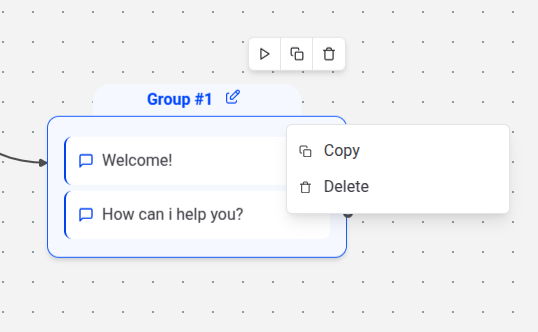
- Duplicate: Creates an exact replica of the group, including all blocks and settings, ideal for iterative design or testing.
- Delete: Removes the selected group, ensuring you confirm to avoid accidental data loss.
Caution: Deleting a group cannot be undone—back up your workflow beforehand.
Block Context Menu
Right-clicking on a block reveals a context menu with the following options:
- Duplicate: Generates a copy of the block directly below the original, retaining all configurations for seamless replication.
- Delete: Eliminates the selected block from the workflow, with a prompt to confirm the action.
Edge Context Menu
Right-clicking on an edge opens a context menu with the following options:
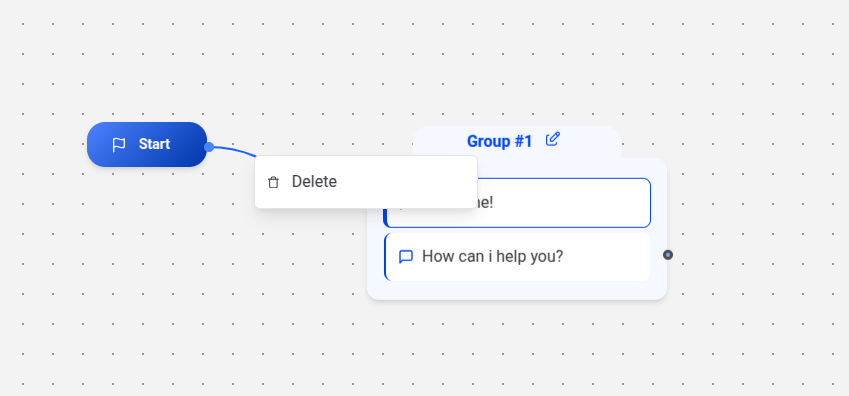
- Delete: Removes the selected edge, disconnecting the linked blocks, with a confirmation step to prevent unintended changes.
Tip: Use Delete sparingly on edges to maintain flow integrity—review connected blocks first.
Best Practices
- Preview Actions: Test context menu options in the Flow Editor’s preview mode to ensure desired outcomes.
- Organize Groups: Duplicate groups strategically to manage complex workflows without clutter.
- Backup Regularly: Save your project before deleting elements to avoid losing progress.
- Consistent Naming: Use clear names for duplicated blocks or groups to track changes easily.